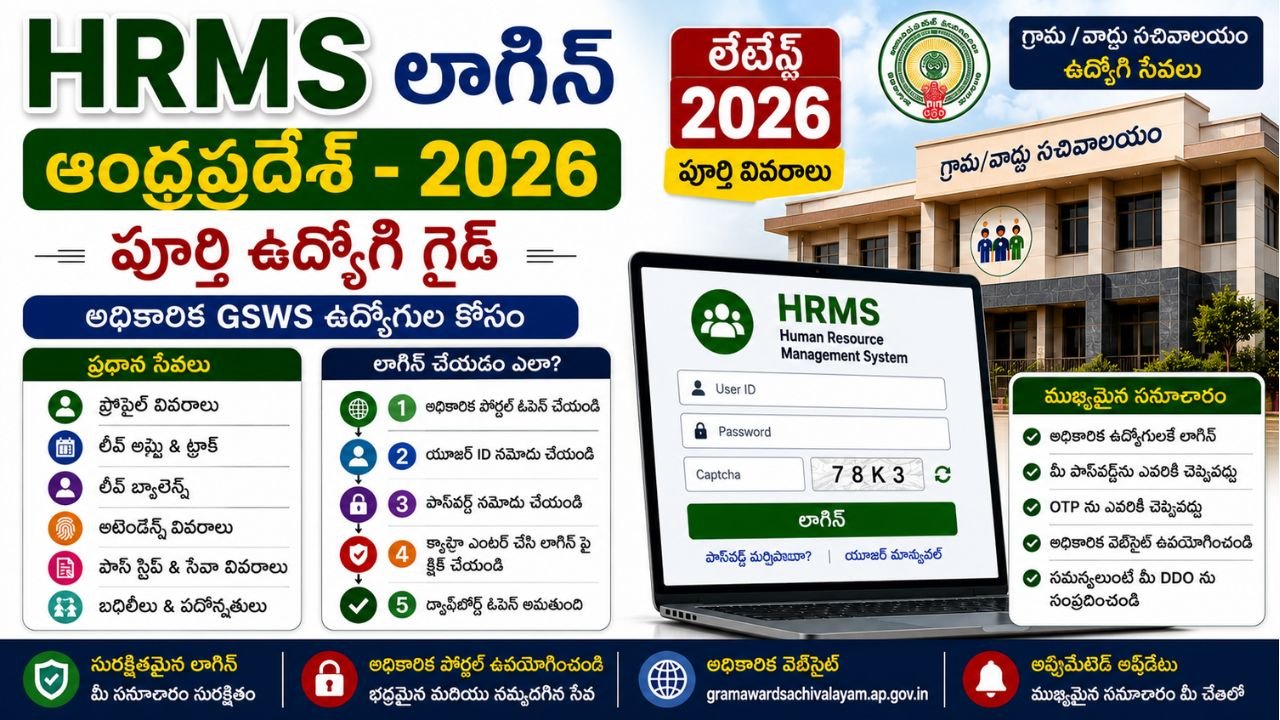
HRMS Login Andhra Pradesh 2026
The HRMS Login Andhra Pradesh system is an important online facility associated with employee-related administration under the Andhra Pradesh government and Grama/Ward Sachivalayam ecosystem.
For authorized employees and officials, online HR systems can help manage employee information and administrative activities without depending entirely on physical paperwork.
For GSWS-related users, it is particularly important to understand that HRMS, Leave Management, salary/pay-slip services and financial systems are not necessarily the same portal. Using the correct portal for the required service can prevent login and access confusion.
The GSWS portal has historically provided an employee-facing Leave Management System login at:
https://gramawardsachivalayam.ap.gov.in/GSWSLMS/Login
Available documentation describes this as the login point for authorized GSWS functionaries and explains functions such as leave application, attendance regularisation and related employee workflows.
For general employee service management, Andhra Pradesh government district information also identifies HRMS/NIDHI as a system used for employee service management, including salaries, increments, transfers, promotions and leave balances.
Because different employee systems serve different purposes, this guide explains the distinction clearly.
What Is HRMS?
HRMS stands for Human Resource Management System.
In simple terms, it is an online system designed to manage employee-related information and administrative processes.
Depending on the particular government department and system, HRMS-related facilities can include:
- Employee profile information
- Service records
- Attendance-related information
- Leave information
- Leave applications
- Leave balance
- Transfers
- Promotions
- Salary-related information
- Other employee administration
The exact facilities available depend on the employee’s department, role and authorized portal.
The Andhra Pradesh Treasuries and Accounts Department currently describes HRMS/NIDHI as being used for employee service management, including salaries, increments, transfers, promotions and leave balances.
HRMS Login vs GSWS LMS Login
This is one of the most important points for employees.
The terms HRMS Login and GSWS LMS Login are sometimes used interchangeably online, but they should not automatically be treated as identical services.
| Portal / System | Main Purpose |
|---|---|
| GSWS LMS | Leave and related employee workflows for GSWS functionaries |
| HRMS / NIDHI | Employee service management and related records |
| CFMS | Government financial transactions and finance-related functions |
| Department-specific HRMS | Employee administration for a particular department |
The official GSWS-related documentation describes the GSWS LMS login as being used for leave applications and related functions.
The Andhra Pradesh Treasuries and Accounts Department separately identifies HRMS/NIDHI for broader employee service management.
Therefore, always use the portal applicable to your particular employee service.
Who Can Use GSWS HRMS / Employee Login?
These systems are not ordinary citizen-service portals.
Access is generally intended for authorized government employees and officials who have valid credentials and permissions.
Depending on the particular module, users can include:
- Grama/Ward Secretariat functionaries
- Authorized GSWS employees
- DDO-level officials
- Mandal-level officials
- Other authorized government personnel
The functions shown after login can differ according to the user’s role.
For example, available documentation describes different workflows for ordinary functionaries, DDO users and Mandal-level officers.
Official GSWS HRMS / LMS Login
For GSWS employee-related leave management, the documented official login address is:
https://gramawardsachivalayam.ap.gov.in/GSWSLMS/Login
The login requires authorized credentials.
Because government portals can be updated or temporarily unavailable, users should always verify the current link through the official Andhra Pradesh GSWS website before entering their credentials.
Official Grama Ward Sachivalayam Portal
How to Login to GSWS HRMS / LMS
Step 1: Open the Official GSWS Portal
Open the official Andhra Pradesh Grama Ward Sachivalayam website.
Avoid entering employee credentials into links received through unknown WhatsApp messages, social media posts or unofficial websites.
Step 2: Open the Employee Login
Navigate to the applicable employee login or LMS section.
For the documented GSWS Leave Management System, the login address is:
gramawardsachivalayam.ap.gov.in/GSWSLMS/Login
Step 3: Enter User ID
Enter the username or employee login ID provided to you by the authorized department or administrator.
Step 4: Enter Password
Enter your authorized password.
Never share your password with another person.
Step 5: Complete Any Security Verification
If the current login page displays a captcha or another verification step, complete it as shown.
Step 6: Click Login
Select the Login option.
If the credentials are correct and the account is authorized, the appropriate employee dashboard should open.
Step 7: Use the Required Employee Service
After login, the available options depend on your role and permissions.
Depending on the system/module, these can include leave, attendance, profile or administrative functions.
HRMS Employee Services
The exact services vary by portal and role.
Common employee-management functions can include:
Employee Profile
Employees may be able to view information associated with their service profile.
Attendance
Authorized users may have access to attendance-related information.
Leave
The GSWS LMS documentation specifically describes leave-related functions, including applying for leave and related approval workflows.
Leave Balance
Employee leave balance can be available through applicable employee systems.
Attendance Regularisation
Where enabled, authorized users can submit or process attendance regularisation.
Employee Administration
Higher-level users may have additional administrative options.
Service Information
HRMS/NIDHI is identified by the Andhra Pradesh Treasuries and Accounts Department as a system used for employee service management.
How to Apply Leave Through GSWS Employee Login
For GSWS employees using the applicable Leave Management System, the general workflow documented for the system involves logging in and accessing the leave-related options.
Step 1
Login using your authorized employee credentials.
Step 2
Open the leave-related section.
Step 3
Select the applicable leave option.
Step 4
Enter the required dates and other information requested by the system.
Step 5
Submit the request.
Step 6
Track the request through the available dashboard or workflow.
The exact options displayed can vary according to the employee’s role.
DDO Login and Employee Login Are Different
Another important distinction is the role of the Drawing and Disbursing Officer (DDO).
A DDO can have additional approval and administrative functions that are not available to ordinary employees.
Available GSWS documentation describes DDO functions including leave forwarding, applying/regularising attendance and grievance-related options.
Therefore, employees should not expect every account to display the same dashboard.
Mandal-Level Login
The GSWS employee management workflow can also include functions for authorized Mandal-level officers.
The documented system includes functions such as:
- Leave approval
- Attendance regularisation approval
- Leave balance-related administration
These are role-specific functions and should not be confused with the normal employee dashboard.
HRMS Login and Attendance
Attendance is an important employee-management function.
Depending on the applicable GSWS module, employees and authorized officers can have access to attendance-related functions.
The documented GSWS LMS workflow includes attendance regularisation, allowing the applicable authorized user to process attendance-related corrections.
If attendance is missing or incorrect, employees should follow the official departmental procedure rather than attempting to alter records through unofficial methods.
HRMS Login and Salary
This is where many employees become confused.
HRMS/employee management and salary-related services can involve different systems.
The Andhra Pradesh Treasuries and Accounts Department states that HRMS/NIDHI is used for employee service management and also identifies salary-related employee services within the broader employee-management ecosystem.
At the same time, CFMS is used for government financial transactions.
Therefore, do not assume that every salary-related function will appear inside the same GSWS LMS dashboard.
HRMS and NIDHI
The Andhra Pradesh Treasuries and Accounts Department currently describes:
HRMS / NIDHI Portal
as a system used for employee service management, including:
- Salaries
- Increments
- Transfers
- Promotions
- Leave balances
This makes HRMS/NIDHI relevant to government employees who need employee-service information beyond the GSWS leave-management workflow.
HRMS and CFMS Difference
The two systems should not be confused.
| HRMS / NIDHI | CFMS |
|---|---|
| Employee service management | Government financial management |
| Employee information | Financial transactions |
| Service-related records | Bills and financial processing |
| Leave-related information | Finance-related functions |
| Transfers and promotions | Treasury/financial workflows |
The Andhra Pradesh government describes CFMS as the system used for government financial transactions, while HRMS/NIDHI is used for employee service management.
What If HRMS Login Is Not Working?
If you cannot log in, first determine what type of problem you are experiencing.
Wrong Username
Check whether you are entering the correct employee User ID.
Wrong Password
Re-enter the password carefully.
Remember that passwords are generally case-sensitive.
Account Not Active
If your account has not been activated or has been disabled, you may need assistance from the authorized administrator.
Portal Temporarily Unavailable
Government portals can sometimes experience maintenance or technical problems.
Try again later after confirming that you are using the official website.
Browser Problem
Try:
- Refreshing the page
- Clearing browser cache
- Using another supported browser
- Checking your internet connection
Incorrect Portal
You may simply be trying to access a service through the wrong system.
For example, a GSWS leave function and an employee salary/service function may use different systems.
Forgot HRMS Password
If you forget your password, do not ask an unknown person to access your account.
Use the official password-recovery option if the current portal provides one.
If no recovery option is available, contact the appropriate authorized administrator or departmental support channel.
Do not share your password or OTP with anyone.
HRMS Login Security Tips
Employee portals contain sensitive professional information.
Follow these basic security practices:
- Never share your password.
- Never share an OTP.
- Avoid saving passwords on public computers.
- Check the website domain before logging in.
- Do not use suspicious links.
- Log out after completing your work.
- Do not share screenshots containing sensitive employee information.
- Keep your browser updated.
Common HRMS Login Mistakes
Using a Private Website
Search results can contain websites that explain HRMS but are not government portals.
Use the official government portal for actual login.
Assuming Every HRMS Is the Same
Different Andhra Pradesh departments can have different HRMS systems.
Using Citizen Login
HRMS is an employee-oriented system and is not the same as a citizen-service portal.
Sharing Credentials
Never give your employee password to another person.
Confusing HRMS With CFMS
HRMS and CFMS have different purposes.
Confusing GSWS LMS With Salary Portal
The GSWS LMS is particularly associated with leave and employee workflow functions, while salary/service-management functions can involve HRMS/NIDHI and other applicable systems.
HRMS Login Quick Guide
| Requirement | Details |
|---|---|
| User | Authorized employee/official |
| Login | User ID + Password |
| Main purpose | Employee administration |
| GSWS LMS | Leave and related workflows |
| HRMS/NIDHI | Employee service management |
| Attendance | Available in applicable modules |
| Leave | Available in applicable modules |
| Salary | Applicable employee/finance systems |
| Public citizen login | No |
| Password sharing | Never |
Benefits of HRMS Employee Services
Online employee-management systems can provide several practical benefits.
Reduced Paperwork
Employees can complete applicable administrative activities online.
Faster Processing
Digital workflows can reduce unnecessary physical movement of documents.
Better Record Access
Employees can access applicable information through authorized dashboards.
Transparent Workflow
Leave and approval processes can be tracked through the relevant system.
Centralised Employee Information
HRMS/NIDHI supports employee service management across applicable government functions.
Important 2026 Note
Government portals and employee systems can be modified over time.
Therefore, this article should not be treated as a guarantee that every employee will see the same buttons, dashboard or services.
Your available options depend on:
- Department
- Employee role
- Login type
- Current government configuration
- Module permissions
The official portal shown to your account should be treated as the final source for the currently available functions.
Frequently Asked Questions
What is HRMS Login Andhra Pradesh?
HRMS Login Andhra Pradesh refers to authorized employee access to an HR management system used for employee-related administration.
What is GSWS HRMS Login?
For GSWS employees, HRMS-related searches can refer to employee-management facilities, while the documented GSWS LMS login is specifically used for leave and related employee workflows.
Who can log in to HRMS?
Only authorized employees and officials with valid credentials should access the employee portal.
Can citizens use HRMS?
HRMS is primarily an employee-management system. Citizens should use the appropriate GSWS citizen-service portal for public services.
Can I apply for leave through GSWS?
The GSWS Leave Management System supports leave-related workflows for authorized functionaries.
Can I check attendance?
Attendance-related functionality can be available through applicable GSWS employee modules.
Can I check leave balance?
Leave balance is an employee-management function available through applicable systems. The Andhra Pradesh Treasuries and Accounts Department identifies leave balances among HRMS/NIDHI employee-service functions.
Is HRMS the same as CFMS?
No. HRMS/NIDHI focuses on employee service management, while CFMS is used for government financial transactions.
What should I do if my HRMS password is forgotten?
Use the official recovery facility if available. Otherwise, contact the authorized departmental administrator.
Why is my HRMS dashboard different from another employee’s?
Employee dashboards can differ according to role, department and permissions.
Is HRMS available to all Andhra Pradesh government employees?
Andhra Pradesh has employee-management systems used across government departments, but the specific portal and functionality can differ by department.
Is the GSWS LMS login the same as NIDHI?
No. They serve different purposes. GSWS LMS is associated with leave and related workflows, while HRMS/NIDHI is identified by the AP Treasuries and Accounts Department for employee service management.
Official Andhra Pradesh Government Links
GSWS Official Portal:
Grama Ward Sachivalayam Official Portal
GSWS LMS Login:
GSWS Employee Leave Management Login
AP Government:
Andhra Pradesh Government Official Website
Related SwarnaGramam Pages
- GSWS Services Andhra Pradesh
- GSWS Citizen Services
- Village Secretariat Staff
- Village Secretariat Departments
- Village Secretariat Services List
- GSWS Services by Department
- SwarnaGramam Home Page
Conclusion
HRMS Login Andhra Pradesh 2026 is primarily relevant to authorized government employees and officials who need access to employee-management and administrative services.
For GSWS employees, it is especially important to distinguish the GSWS Leave Management System from broader HRMS/NIDHI and financial systems such as CFMS. The official GSWS documentation describes leave, attendance regularisation and related workflows, while the Andhra Pradesh Treasuries and Accounts Department identifies HRMS/NIDHI for broader employee service management.
Before logging in, always confirm that you are using the correct official portal for the service you need.
For GSWS employee leave-related access: use the official GSWS LMS login.
For broader employee service management: use the applicable HRMS/NIDHI system provided for your department.
Most importantly, keep your User ID, password and OTP confidential and never enter employee credentials into unofficial websites.
SwarnaGramam.co.in:
https://swarnagramam.co.in/